Script a Blueprint
Add Python behavior to a Blueprint you already use. UnrealPy generates a script and remembers which Blueprint it belongs to.
Create and open the script
-
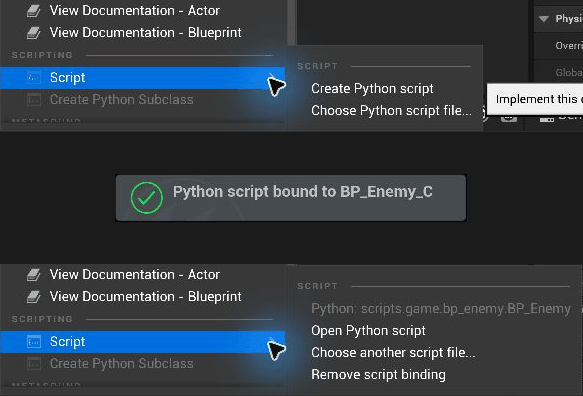
In the Content Browser, right-click the Blueprint and choose Script → Create Python script. You can also use Script in the Blueprint Editor toolbar.

-
In the generated file, keep the imports and the class header. Add the event methods, properties, or functions you need to the class body.
- Save the Python file. In Unreal, compile and save the Blueprint, then press Play to try the changes.
To reopen the file, choose Script → Open Python script.
Watch the Blueprint Script menu change (GIF)
Add behavior
For example, add these members to the generated script for an enemy Blueprint that already has a Health variable:
    health: float
    shield: float = ue.uproperty(50.0, category="Combat")

    def begin_play(self) -> None:
        ue.log(f"shield {self.shield}")

    @ue.ufunction
    def take_hit(self, damage: float) -> None:
        self.health -= damage
Shield appears in the Blueprint's variables. Search for Take Hit in the Event Graph to call the Python function.
Rules
- Methods named after an event of the class implement it. An event the Blueprint's graph also implements is a compile error. Other methods are helpers.
ue.uproperty(...)declares new Blueprint variables. Plain annotations without it name existing variables and are type-checked through the Blueprint's stub; other annotated attributes stay Python-only.@ue.ufunctionmethods become Blueprint functions the graph can call.@ue.udelegatebecomes an event dispatcher andue.componentadds a Blueprint component.- Define
post_initrather than__init__. - Rebinding or reloading changes the live instance's Python class without rerunning
post_init.
Missing scripts
If a Blueprint names a script file that was deleted, renamed or moved, UnrealPy logs a warning. Use Script → Choose another script file... to reconnect it, or Script → Remove script binding to detach it.
Save both the Blueprint asset and its Python file with your project. The Blueprint stores the link to the script.