Hot reload
- Open the Beacon tutorial project and stop play. In the Content Browser, double-click Beacon under Python Classes.
- In
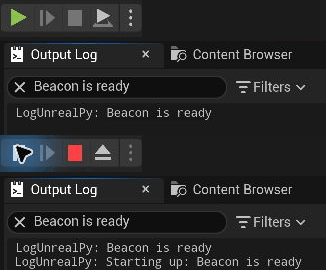
begin_play, changeue.log(self.message)toue.log(f"Starting up: {self.message}")and save. - Return to Unreal and press Play again. In Output Log, search for
Beacon is ready. The latest line begins withStarting up:and still uses the message you set in Details.
Compare the Output Log before and after hot reload (GIF)
Auto Reload Scripts is enabled by default in UnrealPy project settings.
What happens to a redefined class:
- It gets a new Unreal version.
- In the editor, live instances and Blueprint subclasses move to it, keeping their Unreal properties and their
Python state (
self.__dict__).post_initis not run again, so initialise new Python state defensively. - Outside the editor, existing instances keep the version they were created with.
Safe by default
All new versions are checked first. If one is broken (a syntax error, a rejected definition), the reload raises before anything changes and every module keeps its previous version. Modules that derive from or embed the changed types (a subclass, a struct used as a field) are reloaded together, in dependency order.
Reload from code
import ue

ue.reload("mygame.items")        # returns the list of reloaded modules
__main__ and modules without a source file cannot be reloaded.
Limits
- Persistent types only accept additive changes. Adding struct fields or enum entries works; removing, renaming or retyping a field is rejected (Structs and enums).
- A script bound to a Blueprint is rebound to the new class on reload.