Coin game
Try a small Python game in Play In Editor. A game mode spawns three coins that disappear when the player touches them.
Play it in Unreal Editor
- Download coin_game.py and put the sample in your project's
Python/scripts/folder. With auto reload enabled, UnrealPy imports the sample while the editor is open. - Open or create a test level. Use a level with room around its origin so you can see the coins.
-
Open Window → World Settings and set GameMode Override to CoinMode. Keep the default pawn provided by the sample.
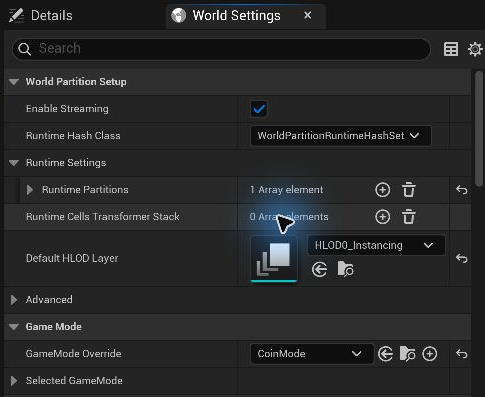
-
Open Window → Output Log and press Play. Use WASD and the mouse to fly through the coins. The log shows the score after each pickup and ends with
Coins: 3/3 (WON).
See how it works
- CoinMode places three Coin actors when the level starts. It owns the score and updates it when the player collects a coin.
- Coin has a sphere trigger, a mesh, and a Spinner component. Its overlap event checks for a pawn and calls the game mode.
- CoinScore and ECoinPhase are a Python struct and enum exposed to Unreal.
See Components, Events, and Structs and enums to adapt the sample.