Types and stubs
UnrealPy generates type hints for Unreal classes and your project's Blueprint assets. Use them to get completion as you edit Python and see type errors before you press Play.
- Open your Unreal project and let UnrealPy finish its Python setup.
-
Keep Configure VS Code enabled in Edit → Project Settings → Plugins → UnrealPy.
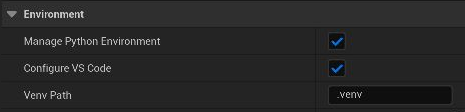
-
Open a script from the Content Browser and work in the project folder in VS Code. If asked to choose a Python interpreter, select the project's
.venv.
For linting and type checking in VS Code, install the Ruff and ty extensions. The editor refreshes the generated stubs as you work.
What completion can see
- Engine: C++ types of the engine, its plugins and your modules, as
ue. Descriptions are cached per engine version and shared by all projects. - Project content:
from ue.assets.Game.Weapons import BP_Rifle. Each content folder is a module; Blueprints, interfaces, structs and enums are typed classes. The stubs follow compiles, saves, renames and deletions in the editor.
Your own script classes
Script classes, structs and enums are typed from your source, not from stubs. ue.uproperty is a
dataclass_transform field specifier, ue.udelegate types as ue.MulticastDelegate[...] with the method's
parameters, and ue.component(cls) types as cls.
Static checking does not synthesize keyword constructors for script classes (Turret(health=5)); use
ue.spawn_actor(Turret, health=5) for statically typed creation.
NumPy types
ue.numpy_types aliases (Vector3f64, Matrix4x4f64) specify rank and dtype; the exact shape is recorded in
Annotated metadata and is not statically enforced.