Classes
Define a class in Python when you want a reusable Unreal type that can be placed or used as a Blueprint parent. To add Python to a Blueprint you already have, start with Script a Blueprint.
Create a Python class
-
In the Content Browser, choose Add → New Python Class....

-
Pick a parent. Use Actor for something you can place in a level, ActorComponent for reusable behavior you can add to actors, or Object for a standalone Unreal object.
- Name the class and check Folder (Python Classes). For example,
Turretinscripts/combatcreatesPython/scripts/combat/turret.py. - Click Create Class to register the class in Unreal and open its generated source file.
To start from an existing C++ or Python class, right-click that class and choose Create Python Subclass. The parent is already selected.

The generated class derives from the parent you picked and uses @ue.uclass. You can change the starter property or add methods in the class body:
import ue


@ue.uclass
class Turret(ue.Actor):
    health: int = ue.uproperty(100)
    label: str = "turret"          # ordinary Python attribute, not an Unreal property

    def post_init(self) -> None:
        self._shots: list[int] = []   # Python-only instance state
Find the class in Unreal Editor
In the Content Browser, expand Python Classes in the Sources panel. The folders follow your Python packages. For example, Python/scripts/combat/turret.py appears under Python Classes → scripts → combat. Double-click Turret to open its source file.
Python Classes is shown by default. If the folder is hidden, open Settings → Show in the Content Browser and enable Python Classes.
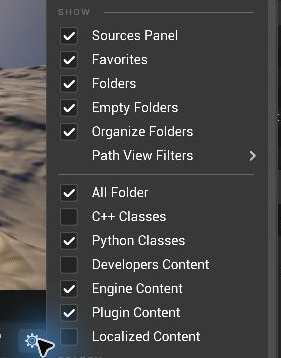
If it derives from ue.Actor, you can place it in a level and edit its properties or create a Blueprint subclass.
Rules
- The class must derive from an Unreal class (
ue.Actor,ue.Object,ue.ActorComponent, ...). - Do not define
__init__; definepost_init(self)instead. It runs after the object is created. - Create instances with keyword arguments only:
Turret(health=50)spawns an actor in the current world or callsue.new_objectfor other classes.ue.spawn_actor(Turret, ...)andue.new_object(...)are the statically typed forms. - A script class cannot derive from a Blueprint class. To add behavior to a Blueprint, see Script a Blueprint.
- Two modules cannot define the same Unreal name. Pass
name="Other"to pick another.
Options
@ue.uclass(name="Cannon", blueprintable=True, interfaces=(Readable,))
class Turret(ue.Actor): ...
| Option | Meaning |
|---|---|
name |
Unreal class name (default: the Python name). |
blueprintable |
Whether Blueprints can subclass it (default True). |
interfaces |
Unreal interfaces the class implements. See Interfaces. |
always_relevant, net_update_frequency, ... |
Network defaults. See Components and net options. |
Class defaults
A plain assignment to an inherited Unreal property sets that property's class default, like a C++ constructor:
@ue.uclass
class ArenaMode(ue.GameModeBase):
    default_pawn_class = ue.DefaultPawn
Python state
Mutable Python state belongs in post_init, so each instance gets its own. On hot reload, live instances keep
their Python state (Hot reload).