Replicated properties
How do I send state from the server to clients?
Mark properties replicated=True, or give a rep_notify method. The class then replicates automatically, and
so do its Python subclasses. No extra registration is needed.
@ue.uclass
class PyDoor(ue.Actor):
    is_open: bool = ue.uproperty(False, rep_notify="on_rep_is_open")
    uses: int = ue.uproperty(0, replicated=True)

    def on_rep_is_open(self) -> None:
        """Clients: the server's new is_open arrived."""
        ue.log(f"door is now {'open' if self.is_open else 'closed'}")
replicated=True: the server's value is sent to clients.rep_notify="method_name": adds an Unreal RepNotify callback. It runs on clients when a new value arrives, and needs no additional decorator.- Python-only state is not replicated. Each side keeps its own
post_initstate.
Try it with two players
- Place the replicated actor in the level and save. Give the server a way to change the property during play, such as an interaction that calls a server RPC.
-
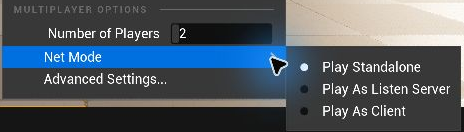
Open the ⋮ menu next to Play. Set Number of Players to 2 and choose Net Mode → Play As Listen Server. Use Advanced Settings to enable Run Under One Process if needed.
-
Open Window → Output Log, then start Play In Editor. Trigger the interaction and check the client window. In this example, a change to
is_openalso prints the new state when the client runson_rep_is_open.
See Unreal Engine's multiplayer testing guide for details on the play settings.
Next: Remote calls.