Run code at game startup
How do I start my game from Python?
Use this when you want a function to run once at game launch. For logic that belongs to an actor, use begin_play so you can try it in Play In Editor.
# Python/mygame/boot.py
import ue


def main(_args: list[str]) -> None:
    world = ue.get_world()
    ue.log(f"Started in {world.get_name() if world else 'no world'}")
-
In Edit → Project Settings → Plugins → UnrealPy, set Startup Module to
mygame.boot:main.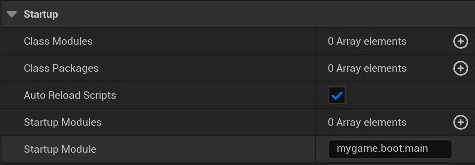
-
Save the project and restart Unreal Editor if prompted.
-
Open the ⋮ menu beside Play and choose Standalone Game. Look for the startup message in the log.
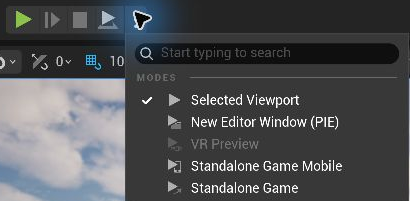
The function runs once when the game starts, including in a packaged game. Use Standalone Game to test it in the editor.
Other startup hooks
- Startup Modules imports modules once the engine and interpreter are ready.
- Class Modules and Class Packages register modules that define Unreal types. See Project settings.